flutter 6

[Flutter] 웹 스크래핑으로 웹 사이트 데이터 수집하기

학교 앱을 개발하기 위해 공지사항 데이터가 필요했지만, 학교 웹사이트에서만 공지사항이 노출되고 있었기 때문에 사이트에서 직접 긁어와야 했다.필요한 데이터는 공지사항 내용이랑 공지사항의 링크 주소 였다. 1. 스크래핑을 위해 해당 package가 필요하다.import 'package:http/http.dart' as http;import 'package:html/dom.dart' as html;import 'package:html/parser.dart' as parser;2. 일단 SSL 인증이나 검증을 무시하기 위해서 http요청 기본설정을 바꿨다.HttpOverrides.global = MyHttpOverrides();class MyHttpOverrides extends HttpOverrides{ @..

카테고리 없음 2024.06.21

[Flutter] Window 빌드 하는 방법

기존의 AOS, IOS 프로젝트를 Window로 빌드하는 방법이다. 1. Visual studio 2022 설치 2. c++ 데스크톱, 모바일 개발 설치 *만약 설치를 하지 못했다면 여기서 C++ 개발을 다운받아준다. 3. 명령 프롬프트에서 winget install Microsoft.NuGet 실행(https://stackoverflow.com/questions/71734042/flutter-windows-build-nuget-is-not-installed ) 사용약관 동의에 Y 해준다. 4. flutter clean flutter pub get 5. flutter create --platforms=windows,macos,linux . 입력 6. Windows(desktop)으로 빌드하기 ///안될 ..

Flutter 2024.01.15

[Flutter] Json 데이터 받아올 시 DateFormat 불가 오류 해결

String 형태인 Json 데이터를 받아왔는데 분명 날짜와 시간이 정확한데 Invalid date format이라며 DateFormat이 불가했다. Invalid date format 20230308T093800 이런식으로 정확한데 변환이 되지 않았다. 혹시 뒤에 공백이 있나 싶어 Trim()과 substring 모두 사용해 봤지만 작동되지 않았다. 해당 Json 데이터를 자세하게 보기 위해 로그를 찍어봤더니 Time의 구조가 "100000\u0000\u0000\u0000\u0000"와 같이 나와있었다. 찾아보니 \u0000은 유니코드 공백, Null이라고 한다. json['time'].replaceAll('\u0000', '') 와 같이 \u0000을 replace하여 해결하였다.

Flutter 2023.03.08

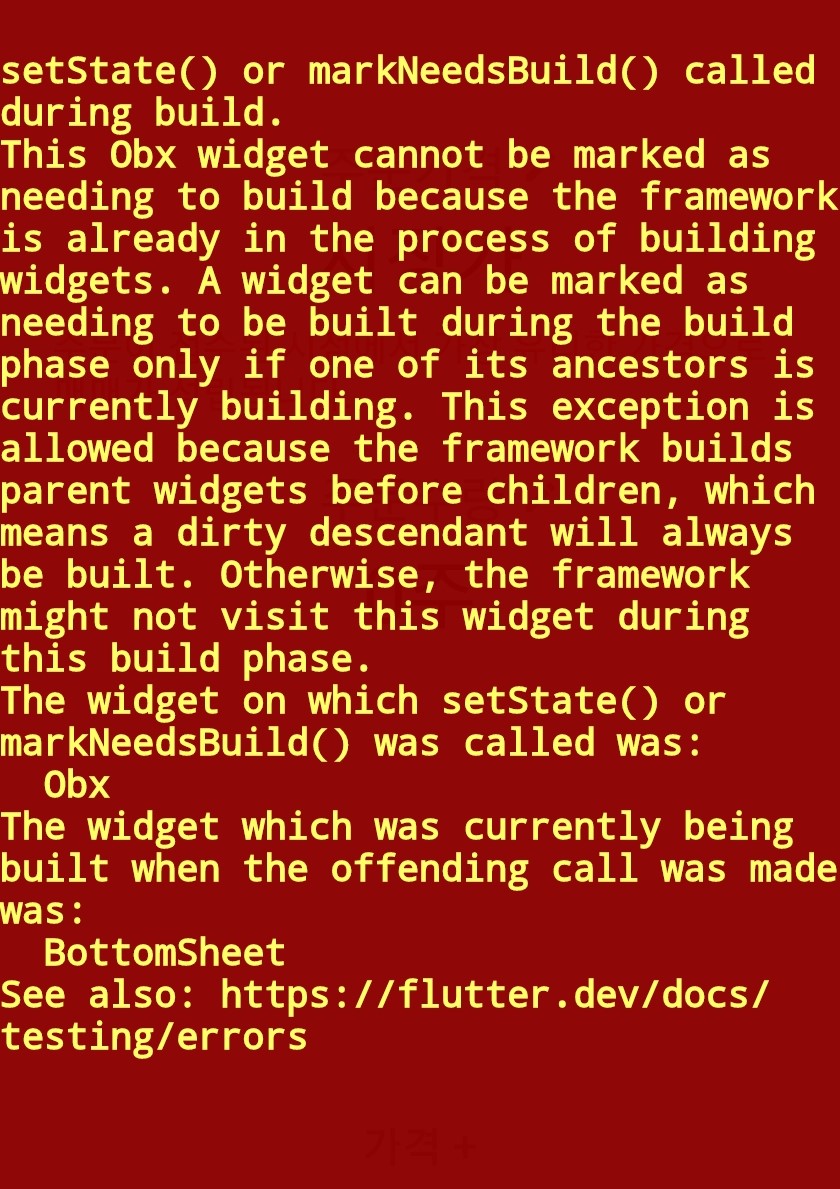
[Flutter] Getx, Modal Bottom Sheet, This Obx widget cannot be marked as needing to build beacause the framework is already in the process of building widgets 오류 해결

Obx로 감싸진 버튼을 클릭하면 함수로 Modal Bottom Sheet를 불러오는데 한 번 클릭 했을 때는 문제가 없었는데 두 번 째 클릭했을 때는 해당 오류가 떴다. Obx((){ ... OnTap:(){ showBottomContainer(context); } ... }) showBottomContainer(BuildContext context) {showModalBottomSheet( context: context, builder: (BuildContext context) { return Container( ); }, );} 이런 식으로 작성되었었음. 이 함수는 Getx로 관리되는, 즉 Obx로 불러오는데 showModalBottomSheet를 사용하여 또 다시 빌드를 하여 생기는 문제였다. Ob..

Flutter 2023.03.08

[Flutter] Could not resolve all artifacts for configuration ':classpath'. 해결

좀 만들어진지 오래된 프로젝트를 실행하려고 했더니 바로 gradle 관련 오류가 떴다. 저번에도 시간을 잡아먹었던 오류이기 때문에 까먹기 전에 순차적으로 정리하려고 한다. 1) Kotlin 버전 맞추기 android 파일에 있는 build.gradle 파일을 들어가준다. buildscript { ext.kotlin_version = '1.7.20' //1.5.30 repositories { google() jcenter() } dependencies { classpath 'com.android.tools.build:gradle:7.4.1' //4.1.3 classpath "org.jetbrains.kotlin:kotlin-gradle-plugin:$kotlin_version" } } 저기서 $kotlin..

Flutter 2023.02.09